Office Hours | Qmax: Building Formative Assessments with Qmax Faculty Tools
January 23, 2026
Office Hours: Qmax Faculty Portal (February 2026)
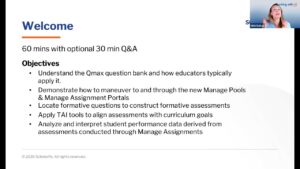
In this “Office Hours” session, the ScholarRx team provides an in-depth walkthrough of the Qmax Faculty Portal, focusing on how educators can leverage these tools to enhance student learning and streamline assessment management. This replay is ideal for course directors, assessment leads, and faculty using Qmax to build efficient, data-driven assessments.
Key Takeaways for Faculty
-
Building Formative Assessments: A step-by-step guide on creating custom assessments that help track student progress and identify specific learning gaps in real-time.
-
Customizable Faculty Tools: An overview of the portal’s suite of features designed to align high-yield content with your institution’s unique curriculum.
-
Integrating High-Yield Content: Learn how to incorporate ScholarRx diagnostic steps and clinical summaries directly into faculty-led assignments.
-
Performance Analytics: Insights into using the portal’s data dashboard to monitor engagement and performance across different student cohorts.
Explore More Webinars
-
Explore practical Qmax workflows for building, managing, and analyzing formative assessments, including faculty tools, assessment insights, and TAI-assisted question creation.
-
Explore practical ways to use TAI to accelerate medical education content development while maintaining faculty oversight, academic rigor, and instructional quality.
-
Explore practical Qmax workflows for building, managing, and analyzing formative assessments, including new faculty tools and TAI-assisted assessment creation.