
A New Way to Organize and Build Assessments in ScholarRx

Faculty spend a remarkable amount of time finding, reviewing, and assembling questions. Not because good items are hard to find, but because it is difficult to keep everything aligned, organized, and reusable across courses, terms, and teaching teams.
Today, we are introducing a new way to do that inside the ScholarRx Faculty Portal.
With today’s release, Pools and the updated Manage Assignments experience bring question organization, AI-powered discovery, and assessment building into a single, connected workflow.
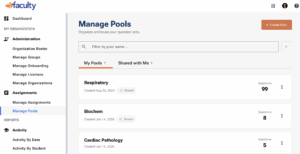
One Place for Questions and Assessments
In the Faculty Portal, you will now find an Assignments section that includes both Manage Assignments and Manage Pools. This brings together two things faculty do every day: organizing questions and building exams.
Pools give you a simple way to create collections of questions based on a course, unit, topic, or exam. You might have a pool for Renal Pathology, one for Endocrine Review, or one for a CBSE review. You can add questions over time, remove ones you no longer need, and share pools with colleagues so everyone is working from the same curated set.
For faculty who already used pools in Qmax Management, those collections will appear automatically in the new experience. For others, this is a new and powerful way to start building a reusable question library.
Finding Questions with TAI
Pools are tightly connected to TAI, ScholarRx’s AI-powered teaching assistant.
When you open a pool, you can search for questions by topic, discipline, or organ system. You can paste in question IDs, enter keywords, or upload documents like syllabi, lecture slides, or readings. TAI analyzes what you provide and returns questions that best match your curriculum.
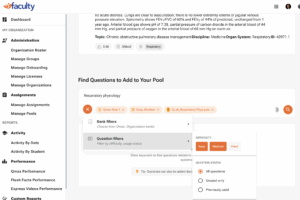
Each question is shown with rich context, including difficulty, past student performance, the question bank, and any images, audio, or video included in the item. This makes it easier to review and select questions with confidence.
Building a Living Question Library
As you search, you can add questions to a pool in one click, or select only the ones you want. Questions can live in more than one pool, and you can even create a new pool on the fly as you work.
Over time, this turns pools into a living library of questions that reflects how your program teaches and assesses, not just a single exam.
Pools can also be shared with individual instructors or faculty groups. Everyone with access can contribute to the pool and use it when building assignments, making it easier to collaborate across courses and teaching teams.
From Pools to Published Exams
Pools now connect directly to the way assignments are built.
Inside Manage Assignments, you can select one or more pools, apply filters like question bank, difficulty, and usage status, and even upload course documents. Before running a search, TAI shows a plain-language summary of what it is about to look for, so you always know what is driving the results.
This means TAI is no longer searching everything in the system. It is searching the exact question set you define.
Designed for How Faculty Actually Work
This release is about more than new features. It is about creating a workflow that matches how faculty teach, collaborate, and assess.
With Pools, TAI, and the updated Assignments experience working together, it becomes easier to find aligned questions, organize them for future use, and build assessments that best reflect your curriculum.
We look forward to seeing how you and your teams use these tools to make assessment creation more consistent, efficient, and connected across ScholarRx.